 Procell Repair
Create a repair ticket
The heart of the shop. In about two minutes you'll take in a device, price the job, and give the customer a receipt.
-
Open New repair
Go to Repairs and tap New repair — or just press N from anywhere.
-
Pick the customer
Search by phone or name. New customer? Add them on the spot. No details to hand? Choose Walk-in.
Tip: the phone number is the customer's key — the same person is never duplicated. -
Choose the device
Select Brand → Device type → Model. Start typing to filter — the model list narrows as you type. Missing one? Tap + New to add it without leaving the screen.
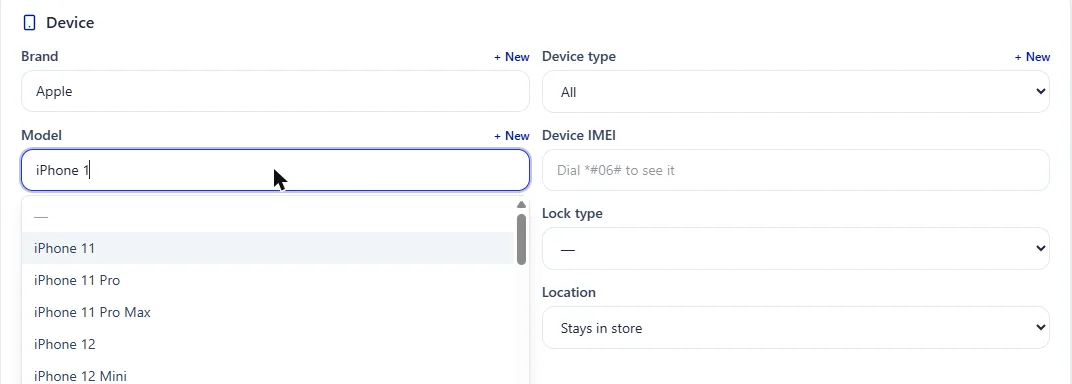
The searchable Brand / Model selectors. -
Add the problem and the exact part
Choose the problem (screen, battery, charge port…). Pick the exact part variant — OLED, Incell, OEM Pull — each carries its own cost and suggested price.
-
Set the price and take a deposit
The system suggests a price from the part cost plus labor. Adjust if you like, and take an optional deposit up front.
-
Save and print
Save the ticket. Print the receipt for the customer and a label for the device — one tap does both.
-
Track status and deliver
Move the job through In progress, Waiting for part and Ready. When the customer picks up, hit Deliver and capture a signature.
Good to know: the customer can follow status, photos and balance in their portal — and pay online.
Procell POS runs your repairs, sales, inventory and customer portal. Free plan, no card — up to 15 transactions a month.