
Create a repair ticket
The heart of the shop. In about two minutes you'll take in a device, price the job, and give the customer a receipt.

-
Open New repair
Go to Repairs and tap New repair — or just press N from anywhere.
-
Pick the customer
In the customer field, type the phone number or the name. As you type a name, matching customers appear: pick one and the phone and name fill in. New customer? Type their phone and name; they are created when you save the ticket. A repair always takes the customer's phone: it is how you let them know it is ready.
Tip: the phone number is the customer's key — the same person is never duplicated. -
Choose the device
Select Brand → Device type → Model. Start typing to filter — the model list narrows as you type. Missing one? Tap + New to add it without leaving the screen.
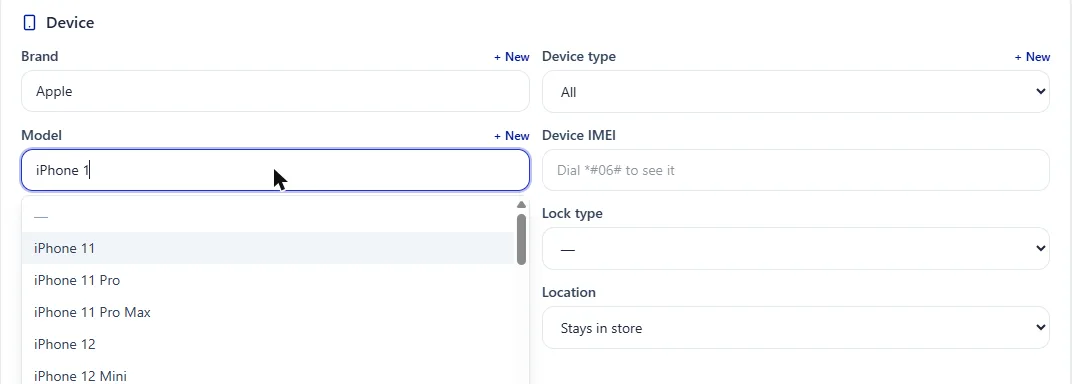
The searchable Brand / Model selectors. -
Add the problem and the exact part
Choose the problem (screen, battery, charge port…). Pick the exact part variant — OLED, Incell, OEM Pull — each carries its own cost and suggested price.
-
Set the price and take a deposit
The system suggests a price from the part cost plus labor. Adjust if you like, and take an optional deposit up front.
-
Price changed? Fix it on the ticket
Open the ticket in Repairs. Under Work to do, tap the pencil next to the line's price (or Edit price in the line menu), type the new one and save. The balance updates on its own. Once the ticket is delivered, only the owner or a manager can correct it.
-
Save and print
Save the ticket. Print the receipt for the customer and a label for the device — one tap does both.
-
Track status and deliver
Move the job through In progress, Waiting for part and Ready. When the customer picks up, hit Deliver and capture a signature.
Good to know: the customer can follow status, photos and balance in their portal — and pay online.
Procell POS runs your repairs, sales, inventory and customer portal. Free plan, no card — up to 15 transactions a month.