
Add a product to inventory
Scan a SKU and the system fills in the rest from the parts catalog — brand, model, type and cost. Here's the fastest way in.

-
Open Add item
Go to Inventory and tap + Add item.
-
Scan or type the SKU
Scan the distributor's SKU (or type it). The system finds it in the live catalog and auto-fills the brand, model, type, image and cost for you.
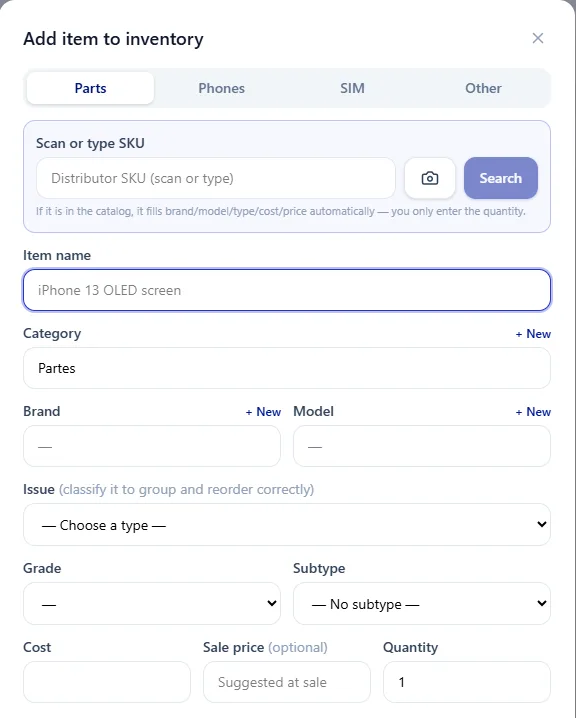
Scan the SKU and the fields fill themselves. No SKU? Fill brand, model and problem by hand — the Model box is searchable, just type to filter. -
Pick the category
Choose what it is: Part, Accessory, Phone (tracked by IMEI) or SIM (by ICCID).
-
Set cost and quantity
Parts store the cost — the system suggests the sale price from your markup. Enter how many units you're adding to this store.
-
Save
Save, and the product is in stock. It'll show up when you pick parts for a matching repair.
-
A product doesn't show up when you ring it up
New sale and the In stock view of Inventory only list products with stock. One at 0 (a warranty you sell, say) is under Sold out: tap Restock there to add units.
-
Repair warranty terms are set apart
The warranties you attach to repairs are not products: set them in Repairs › gear › Repair settings › Warranties. Each one has a name, a single duration in days and a note for the customer.
-
Work on consoles, watches or another device that isn't listed?
Add it yourself. In Inventory, menu › Catalog & lists › Device types › New type (for example «Console»). Then, under Brands and Models, New brand and New model (PlayStation 5, Nintendo Switch…). From then on they show up when you add devices and create repairs. The owner, or anyone with catalog permission, can do it.
Procell POS runs your repairs, sales, inventory and customer portal. Free plan, no card — up to 15 transactions a month.